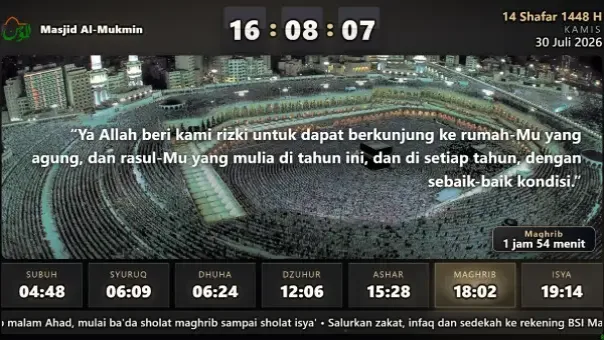
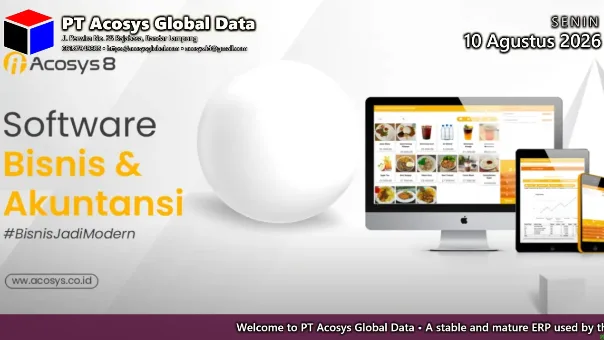
🕌 Astronomically Accurate Prayer Times🖼️ Slides, Video & Scrolling Text📱 Managed From Your Phone📶 Works Without Internet🔔 Scheduled Audio🖥️ Many Screens, One Dashboard🕌 Astronomically Accurate Prayer Times🖼️ Slides, Video & Scrolling Text📱 Managed From Your Phone📶 Works Without Internet🔔 Scheduled Audio🖥️ Many Screens, One Dashboard
24 /7
Runs and refreshes on its own
0
Internet connections required
5
Ready-made screen layouts
1 year
Hardware & software warranty
The full feature list

One platform, two modes

The device and the software are identical. Each screen is simply set to mosque mode or general mode — mosque mode adds the entire prayer-time stack on top of the same core features.

⚙️ Core features — active in both modes

What every screen uses

The foundation of every display, whether it hangs in a mosque or a hotel lobby.

🖥️

Dependable hardware

A purpose-built mini computer with HDMI output, compatible with ordinary TVs. Burned in for 6–24 hours before it ships.

🖼️

Images, video and YouTube

A single playlist can hold posters, video, YouTube clips or custom content. Display time is set per item, with seven transitions including random.

📢

Scrolling text & notices

One line equals one message. Anything urgent is typed in and appears on screen without disturbing the playlist.

🗓️

Starts and stops itself

Every item can carry a start and end date. A Ramadan banner or a year-end promotion stops showing on its own, with nobody having to remember it.

🎨

5 layouts, 9 themes

Times along the bottom, a right panel, a left panel, a large panel, or floating over the content. Portrait screens adapt automatically, and the display is available in four languages.

🔔

Scheduled audio

School bells, announcements or music play at fixed times — or relative to prayer times, say ten minutes before the adhan. Configurable by day and by month.

🕌 Mosque mode — added on top of the core

The prayer-time stack

Enabled per screen, so one account can look after the office prayer room and the lobby display at the same time.

🕌

Nine calculation methods

Muslim World League, ISNA for North America, Umm al-Qura, the Egyptian General Authority, Karachi, Diyanet for Türkiye, MABIMS for Southeast Asia and more — or enter your own Fajr and Isha angles. Hanafi and standard Asr both supported.

🌍

High-latitude rules & DST

In cities where the sun barely sets in summer, pick nearest seventh, middle of the night or angle based so Fajr and Isha stay usable. Daylight saving is handled too.

🎧

30 Juz of recitation

Continues automatically from where it left off, paginated to your chosen mushaf. It is scheduled to finish before the adhan rather than being cut off mid-verse.

🌐

Translation audio per verse

Each verse can be followed immediately by its translation, so those waiting also understand what is being recited.

🔊

Adhan & iqamah per prayer

Twelve adhan sounds, each enabled or disabled separately. Iqamah minutes, time correction, image and message are configured per prayer.

🤫

Silent during prayer

While the prayer is performed the screen dims and goes still — no slides changing, no animation to distract the congregation.

📅

Hijri & Gregorian calendar

Side by side, in Latin or Arabic script, with a day correction to match the local decision. Imsak, sunrise and Dhuha can be shown as needed.

🛠️ Management & reliability

So nobody has to babysit it

The part that decides whether your screen is still showing the right thing six months from now.

🖥️

Many screens & locations

Every branch is run from a single dashboard, and each screen can have its own playlist, layout and theme. A fully branded view is available for resellers.

🔗

Pairing by code

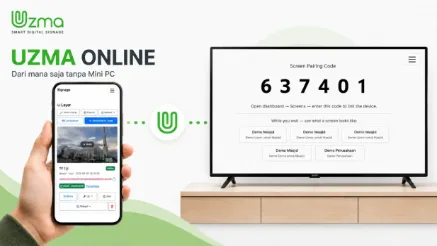
The device shows a six-digit code; enter it in your account and the screen is connected. No complicated network setup.

🔄

Changes arrive within a minute

The screen asks for updates every minute and rebuilds itself as soon as something changes — no unplugging, no restart.

📶

Internet drops, screen keeps going

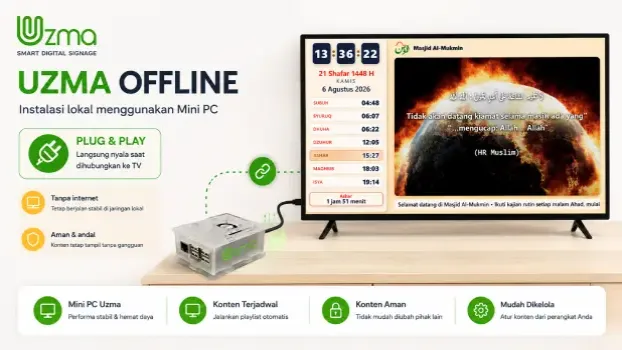
Content and schedules live on the device, so playback continues when the connection is lost. Once it returns, everything syncs by itself.

🔌

Scheduled power saving

The screen can switch itself off some minutes after the adhan — with its own rule for Friday — then wake before the next prayer. Its on/off state is visible in the dashboard.

🩺

Remote diagnostics

Technical checks can be switched on at the TV from the office without visiting the site, and expire by themselves after thirty minutes so they are never left running in front of visitors.

As simple as a tap

Manage it from anywhere — or with no internet at all

UZMA can be used as a cloud service or installed entirely inside your own network. Both are managed from the same pages on your phone.

1

Connect

Plug the UZMA device into your TV's HDMI port, then enter the code shown on screen into your account.

2

Set the content

Manage slides, video, scrolling text, reciter choice, audio schedules and prayer-time corrections from one place.

3

It runs itself

Save, and the screen updates on its own. Audio schedules and power management run all day without supervision.

One device, many uses

At home in all kinds of places

Choose general mode for an all-purpose information board, or mosque mode to add prayer times, adhan and recitation.

🕌 Mosques & Prayer Rooms
🏫 Schools & Campuses
🏨 Hotels
🍽️ Restaurants & Cafés
🏥 Hospitals & Clinics
🏢 Offices & Institutions
🏛️ Government
🛍️ Retail & Malls
30 Juz of recitation

Qur'an audio from world-class reciters

Recitation plays automatically before the adhan and continues from where it left off, with the passage marked on screen. Translation can follow each verse, and the congregation's favourite reciter is chosen straight from a phone.

🎙️ Shaykh Mishary Rashid Alafasy🎙️ Shaykh Sudais🎙️ Shaykh Sa'ad Al-Ghamdi🎙️ Shaykh Shuraim
🎧AutomaticBefore every prayer
📖30 JuzComplete and in order
🌐TranslationAudio after each verse
🤫Stops itselfWhen the adhan arrives
Frequently asked

The questions we hear most

Cannot find your answer here? Get in touch and we will answer it directly.

An ordinary mosque clock only shows the time and the prayer timetable. UZMA runs the whole sequence by itself: recitation before the adhan, the adhan display, the iqamah countdown, and then a screen that falls silent while the prayer is performed. Between those moments it works as a full noticeboard with slides, video and scrolling text. One screen replaces the digital clock, the noticeboard and the audio player at once.

No. Each screen can be set to mosque mode or general mode. In general mode the prayer times are switched off and UZMA becomes an ordinary digital information board for schools, hotels, restaurants, hospitals, offices, public bodies and retail. One account can hold both kinds at once — a lobby display in general mode and a prayer-room display in mosque mode.

Not necessarily. Content and schedules are stored on the device, so playback continues when the internet drops and syncs by itself once the connection returns. There is also a fully offline edition installed entirely inside your own network, with no dependence on the internet at all.

Any standard TV with an HDMI port. The UZMA device is a mini computer that plugs into that port — no smart TV and no particular brand required. Screens can be mounted in landscape or portrait; the display adapts on its own.

Plug the device into the TV, then enter the six-digit code shown on screen into your account — the screen connects immediately. After that everything is managed from a phone browser: slides, video, scrolling text, audio schedules and prayer-time corrections. There is no app to install.

They are calculated from your latitude, longitude and elevation, so they work anywhere in the world. There are nine ready-made calculation methods — Muslim World League, ISNA for North America, Umm al-Qura, the Egyptian General Authority, Karachi, Diyanet for Türkiye, MABIMS for Southeast Asia and others — or you can enter your own Fajr and Isha angles. Standard and Hanafi Asr are both supported, as are high-latitude rules and daylight saving.

Yes. Thirty Juz of recitation play before the adhan and continue from where they left off, scheduled so the reading finishes before the adhan rather than being cut off mid-verse. There are twelve adhan recordings that can be enabled or disabled per prayer, along with a choice of reciters and optional translation audio after each verse.

The screen dims and goes still. No slides change and no animation runs while the prayer is being performed, so nothing distracts the congregation. Once it is over the screen returns to the timetable, the calendar and announcements by itself.

Yes. Every screen and branch is run from a single dashboard, and each screen can have its own playlist, layout and theme. The status of each screen is visible there, and technical checks can be switched on remotely without visiting the site.

No. UZMA can switch the screen off some minutes after the adhan and wake it before the next prayer — with a longer rule of its own for Jumu'ah. In general mode the screen can be scheduled to wake before opening hours and switch off after closing. It saves electricity and extends the life of the panel.

Choose cloud if you want to manage screens from anywhere and oversee many of them centrally; it is licensed per screen. Choose offline if connectivity at the site is limited, or if the data must not leave your own network — install once, with no running subscription.

There are five ready-made layouts (times at the bottom, right panel, left panel, large panel, and floating over the content) and nine colour themes. The display itself is available in four languages: English, Arabic, Indonesian and Malay.

Hardware and software carry a one year warranty. Every device is burned in for 6–24 hours before it ships. Our support teams are spread across several regions and can help online or on site. The full terms are on the warranty terms page.

Yes. There is a reseller programme with a white label option — the product name, logo, colours, icon and even the domain can carry your identity, and your clients never see the UZMA name anywhere. See the reseller page for details.

Still have a question?

Tell us about your premises — we will help you choose the device, the layout and the mode.